
SysTableBrowser extension to control visible fields and pre-applied ranges
Often, due to a large number of fields in the table or an enormous amount of records, the standard SysTableBrowser is heavily lagging, especially on the DEV boxes.
Also, when you are interested in only several field contents, it is not convenient to scroll back and forth to investigate particular field values.
Here is the SysTableBrowser extension, which you can use together with the Table Browser tool.
It allows you to:
- indicate fields which you want to see.
- predefine field ranges to see only specific records
Last updated: April 29, 2026
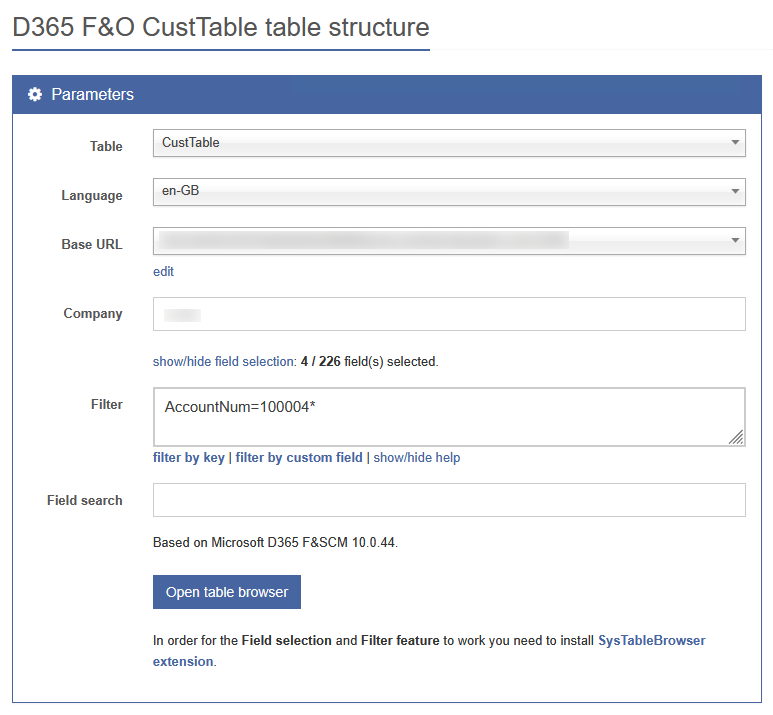
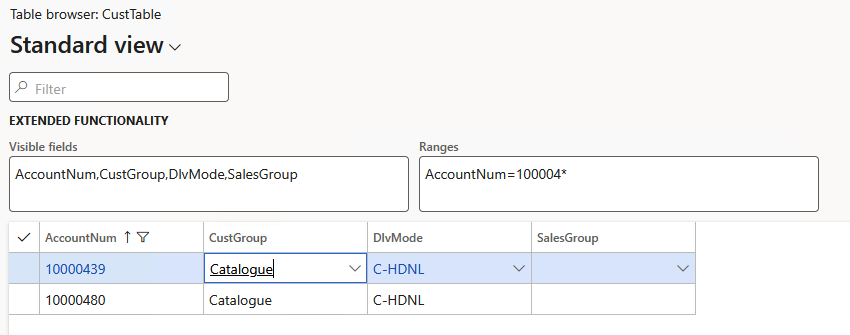
How to install?
- create a class with the name DXTSysTableBrowserFrm_Extension
- copy/paste the following content
- compile
/// <summary>
/// CoC extension of SysTableBrowser form
/// </summary>
[ExtensionOf(formStr(SysTableBrowser))]
final class DXTSysTableBrowserFrm_Extension
{
    private Map                 visibleFieldList;
    private Map                 rangeFieldList;
    private TableId             tableId;
    private FormGridControl     formGridControlAllFields;
    private FormGroupControl    customGroup;
    private str                 parmFieldList;
    private str                 parmRangeList;
    private FormStringControl   visibleFieldListControl;
    private FormStringControl   rangeFieldListControl;

    /// <summary>
    /// CoC for init method
    /// </summary>
    public void init()
    {
        next init();

        parmFieldList               = strLRTrim(getClientURLQueryValue('FieldList'));
        parmRangeList               = strLRTrim(getClientURLQueryValue('RangeList'));
        formGridControlAllFields    = this.design(0).controlName(formControlStr(SysTableBrowser, AllFieldsGrid));
        tableId                     = formGridControlAllFields.formRun().dataSource().cursor().TableId;

        this.dxtParseFieldListParam();
        this.dxtApplyRanges();
        this.dxtShowHideFields(true);
        this.dxtAddControls();
    }

    /// <summary>
    /// Applies datasource ranges.
    /// </summary>
    public void dxtApplyRanges()
    {
        FormDataSource          fds = this.dataSource(1);
        Query                   q;
        QueryBuildDataSource    qbds;

        rangeFieldList = new Map(Types::Integer, Types::Integer);

        container   ranges = str2con(parmRangeList, ',');
        str         rangeValue;
        FieldName   fieldName;
        FieldId     fieldId;
        int         i;

        if (fds)
        {
            q       = fds.query();
            qbds    = q.dataSourceNo(1);
            qbds.clearRanges();

            if (parmRangeList && conLen(ranges))
            {
                for (i = 1; i <= conLen(ranges); i++)
                {
                    str         pairStr = strLTrim(conPeek(ranges, i));
                    container   pairCnt = str2con(pairStr, '=');
                    fieldName   = conPeek(pairCnt, 1);
                    rangeValue  = conPeek(pairCnt, 2);
                    fieldId     = fieldName2Id(tableId, fieldName);
                    if (fieldId && rangeValue)
                    {
                        QueryBuildRange qbr = qbds.addRange(fieldId);
                        qbr.value(rangeValue);
                        if (!rangeFieldList.exists(fieldId))
                        {
                            rangeFieldList.add(fieldId, 1);
                        }
                    }
                }
            }
        }
    }

    /// <summary>
    /// Add additional controls on the SySTableBrowser form.
    /// </summary>
    public void dxtAddControls()
    {
        FormGroupControl   filterGroup = this.design().controlName(formControlStr(SysTableBrowser, CustomFilter));
        FormGroupControl   parentGroup;

        if (filterGroup)
        {
            parentGroup = filterGroup.parentControl();

            customGroup = this.design().addControl(FormControlType::Group, 'DXTCustomGroup', filterGroup);
            customGroup.caption('Extended functionality');
            customGroup.columns(2);

            visibleFieldListControl = customGroup.addControl(FormControlType::String, 'DXTVisibleFields');
            visibleFieldListControl.multiLine(true);
            visibleFieldListControl.width(400, -1);
            visibleFieldListControl.displayHeight(2, AutoMode::Fixed);
            visibleFieldListControl.text(parmFieldList);
            visibleFieldListControl.label('Visible fields');
            visibleFieldListControl.helpText('Comma-separated list of visible field names (AOT).');
            visibleFieldListControl.labelPosition(LabelPosition::Left);

            visibleFieldListControl.registerOverrideMethod(
                methodStr(FormStringControl, modified),
                methodStr(DXTSysTableBrowserFrm_Extension, dxtVisibleFieldListControlModified),
                this);

            rangeFieldListControl = customGroup.addControl(FormControlType::String, 'DXTRangeFields');
            rangeFieldListControl.multiLine(true);
            rangeFieldListControl.width(400, -1);
            rangeFieldListControl.displayHeight(2, AutoMode::Fixed);
            rangeFieldListControl.text(parmRangeList);
            rangeFieldListControl.label('Ranges');
            rangeFieldListControl.helpText('Comma-separated list of field ranges in the format FieldName=RangeValue.');
            rangeFieldListControl.labelPosition(LabelPosition::Left);

            rangeFieldListControl.registerOverrideMethod(
                methodStr(FormStringControl, modified),
                methodStr(DXTSysTableBrowserFrm_Extension, dxtRangeFieldListControlModified),
                this);
        }
    }

    /// <summary>
    /// DXTVisibleFields modified method. To update visible fields, when field list is changed.
    /// </summary>
    /// <param name = "_formControl">FormStringControl</param>
    /// <returns>boolean</returns>
    public boolean dxtVisibleFieldListControlModified(FormStringControl _formControl)
    {
        var locFieldList = strLRTrim(visibleFieldListControl.valueStr());
        if (locFieldList != parmFieldList)
        {
            parmFieldList = locFieldList;
            this.dxtParseFieldListParam();
            this.dxtShowHideFields();
        }

        return _formControl.modified();
    }

    /// <summary>
    /// DXTRangeFields modified method. To update ranges, when ranges are changed.
    /// </summary>
    /// <param name = "_formControl">FormStringControl</param>
    /// <returns>boolean</returns>
    public boolean dxtRangeFieldListControlModified(FormStringControl _formControl)
    {
        var locFieldList = strLRTrim(rangeFieldListControl.valueStr());
        if (locFieldList != parmRangeList)
        {
            parmRangeList = locFieldList;
            this.dxtApplyRanges();
            FormDataSource fds = this.dataSource(1);
            fds.executeQuery();
        }

        return _formControl.modified();
    }

    /// <summary>
    /// Parse visible field list string.
    /// </summary>
    public void dxtParseFieldListParam()
    {
        visibleFieldList    = new Map(Types::Integer, Types::Integer);

        if (parmFieldList)
        {
            container   fieldNames = str2con(parmFieldList, ',');
            FieldName   fieldName;
            FieldId     fieldId;
            int         i;

            for (i = 1; i <= conLen(fieldNames); i++)
            {
                fieldName   = strLRTrim(conPeek(fieldNames, i));
                fieldId     = fieldName2Id(tableId, fieldName);
                if (fieldId)
                {
                    if (!visibleFieldList.exists(fieldId))
                    {
                        visibleFieldList.insert(fieldId, 1);
                    }
                }
            }
        }
    }

    /// <summary>
    /// Show/Hide field based on the user preference.
    /// </summary>
    /// <param name = "_initRun">boolean</param>
    public void dxtShowHideFields(boolean _initRun = false)
    {
        int             fieldCount      = formGridControlAllFields.controlCount(),
                        visFldCount     = visibleFieldList.elements(),
                        i;

        if (_initRun && !visFldCount)
        {
            return;
        }

        for (i = 1; i <= fieldCount; i++)
        {
            FormControl     formControl     = formGridControlAllFields.controlNum(i);
            FieldBinding    fieldBinding    = formControl.fieldBinding();
            FieldId         fieldId         = fieldBinding.fieldId();

            if (!visFldCount || (fieldId && (visibleFieldList.exists(fieldId) || rangeFieldList.exists(fieldId))))
            {
                formControl.visible(true);
            }
            else
            {
                formControl.visible(false);
            }
        }
    }

}
Support The Author
If you found value in what I share, I've set up a Buy Me a Coffee page as a way to show your support.
Post a Comment
All Comments
Obayda Malak 02 August 2026
Your tool is amazing and will solve a lot of issues,
I have created a browser extension
To maximize the benefits of your tool,
Please take a look at the image below
https://ibb.co/V7bfwbM
I will share the source code with you if you want to upload it officially to the Chrome Extension Store
Vasyl Kovalenko 03 August 2026
Hello Obayda Malak,
I originally designed these tools to work together as an interconnected ecosystem that is convenient, fast to use, and as non-intrusive as possible—ideally requiring no installation at all. They all share the same D365 F&SCM Base URL configuration, allowing you to copy and paste the base URL once and immediately use all of them.
The only exception is the Table Browser/Structure tool, where a X++ extension is required to enable filtering and field selection capabilities. Personally, I prefer not to require a separate installation for every tool. Another consideration is the variety of browsers people use—not just Chrome. My primary workflow is to launch these tools directly from the development environment.
That said, I understand that different users have different preferences. As more projects move toward a unified experience without direct access to development environments, the idea of installing a single browser extension on a work laptop or PC becomes much more practical.
If you believe it would be worthwhile to invest time in developing a well-designed extension (for example, using webextension-polyfill to support a wider range of browsers), please feel free to contact me via the Contact Us link in the website footer or through LinkedIn. I'm sure we will work something out.
Best regards.
Search
About
DaxOnline.org is free platform that allows you to quickly store and reuse snippets, notes, articles related to Dynamics 365 FO.
Authors are allowed to set their own "buy me a coffee" link.
Join us.
Blog Tags

2015 © All Rights Reserved.